Use Toon Format to Save Tokens
This article describes how to use Toon format to reduce the token usage when interacting with LLMs.
The complete source is available on GitHub JavaAIDev/toon-spring-ai.
Upgraded to Spring AI 2.0.0.
In AI application development, the number of input and output tokens for large models has always been a concern. Currently, most model services are charged based on the number of input and output tokens, and the number of tokens used by the application directly determines operating costs. Although the price of tokens for model services is rapidly decreasing, the cost of tokens remains as long as the application is running. If the number of input tokens is too large, it may not only reach the limit of the model's context window, but also negatively impact the output quality of large models due to excessive content in the prompts. For these reasons, reducing the number of input and output tokens becomes a real issue.
Structured Data Formats
If structured data needs to be included in the input and output, several formats are typically available: JSON, CSV, and XML.
JSON is currently the most widely used format. This is partly due to the popularity of JSON, which provides access to numerous tools and third-party libraries. Furthermore, the widespread use of JSON schemas has also contributed to its popularity. The input format for tools in the MCP protocol also uses JSON schemas. Of course, the syntax of the supported JSON schemas varies in different places.
JSON syntax has some redundancy, especially when representing arrays. Arrays typically contain elements of the same type and have similar structures. Each element's fields are repeated when represented.
For tabular data, CSV is the most efficient format, incurring minimal overhead because only field names need to be added once in the first row.
JSON format has unique advantages for representing data with complex nested hierarchies, which CSV cannot express.
In real-world development, data often falls between fully nested structures and tabular formats. The more tables embedded in the data, the greater the overhead of using JSON format, due to the increased number of repeated field names.
Toon
Toon, as a new data format, attempts to solve the problem of excessive overhead in JSON format. Toon stands for Token-Oriented Object Notion, meaning an object representation oriented towards tokens. Toon is an encoding mechanism for JSON data. The motivation of the Toon format is to optimize token consumption when interacting with LLMs. When the application sends a request to the LLM, the data is encoded using Toon. The LLM is then required to output in Toon format, and the Toon is then converted into an object or JSON format.
In terms of format, Toon can be seen as a combination of YAML and CSV. Nested object structures are represented using a YAML-like format. For arrays, a CSV-like format is used, where field names appear only once. The number of array elements is also included for easier parsing.
Toon uses the same data model as JSON, including primitive types, objects, and arrays. Primitive types include strings, numbers, booleans, and null; objects are name-value pairs; and arrays are sequences of values. Simple objects use the key: value format. Nested objects use indentation to indicate nesting hierarchy. For arrays, the array length is appended to the field name in []. If the data contains primitive types, these values are encoded as single values. If the data contains tabular data with the same structure, the field names are enclosed in {}, and the data is encoded in CSV format. If the data contains data with a different structure, it is formatted like YAML, using - to separate multiple elements.
Below is an example of the Toon format, showing how primitive types, objects, and arrays are represented.
context:
  task: Our favorite hikes together
  location: Boulder
  season: spring_2025
friends[3]: ana,luis,sam
hikes[3]{id,name,distanceKm,elevationGain,companion,wasSunny}:
  1,Blue Lake Trail,7.5,320,ana,true
  2,Ridge Overlook,9.2,540,luis,false
  3,Wildflower Loop,5.1,180,sam,true
Using Toon with LLM
When interacting with LLMs, if structured data needs to be included in the request, use Toon encoding and include it in the prompt.
If you want the LLM to produce structured output, you can describe the Toon format in the prompt and request the LLM to provide the Toon-formatted output, which can then be parsed using a library.
However, using Toon as the output format for LLMs is not recommended. This is mainly because LLMs are unfamiliar with the Toon format and require a description in the prompts. This description may not be accurate enough. LLMs support JSON format well and do not need to be described in the prompts. Support for JSON schemas in LLMs also facilitates the generation of data that meets schema requirements. From a structured output perspective, using JSON is the best choice. Many model services already natively provide support for the output schema, so it is not necessary to include it in the prompts. This further improves the quality of structured output.
Spring AI Integration
In applications, Toon libraries provide encoding and decoding of Toon format. Java also has a similar library. The following example illustrates this, using Spring AI to interact with the LLM.
When using Toon, add the relevant Maven dependencies. The entry class used is JToon, with encode and decode methods for encoding and decoding, respectively.
<dependency>
    <groupId>dev.toonformat</groupId>
    <artifactId>jtoon</artifactId>
    <version>1.0.9</version>
</dependency>
To demonstrate the Toon format, a User object is created. The User class declaration is shown below, containing an embedded Address object.
package com.javaaidev.toon.model;

import java.util.List;

public record User(String id,
                   String name,
                   String email,
                   String mobilePhone,
                   List<Address> addresses) {

  public enum AddressType {
    HOME,
    OFFICE,
    OTHER,
  }

  public record Address(
      String id,
      AddressType addressType,
      String countryOrRegion,
      String provinceOrState,
      String city,
      String addressLine,
      String zipCode) {

  }
}
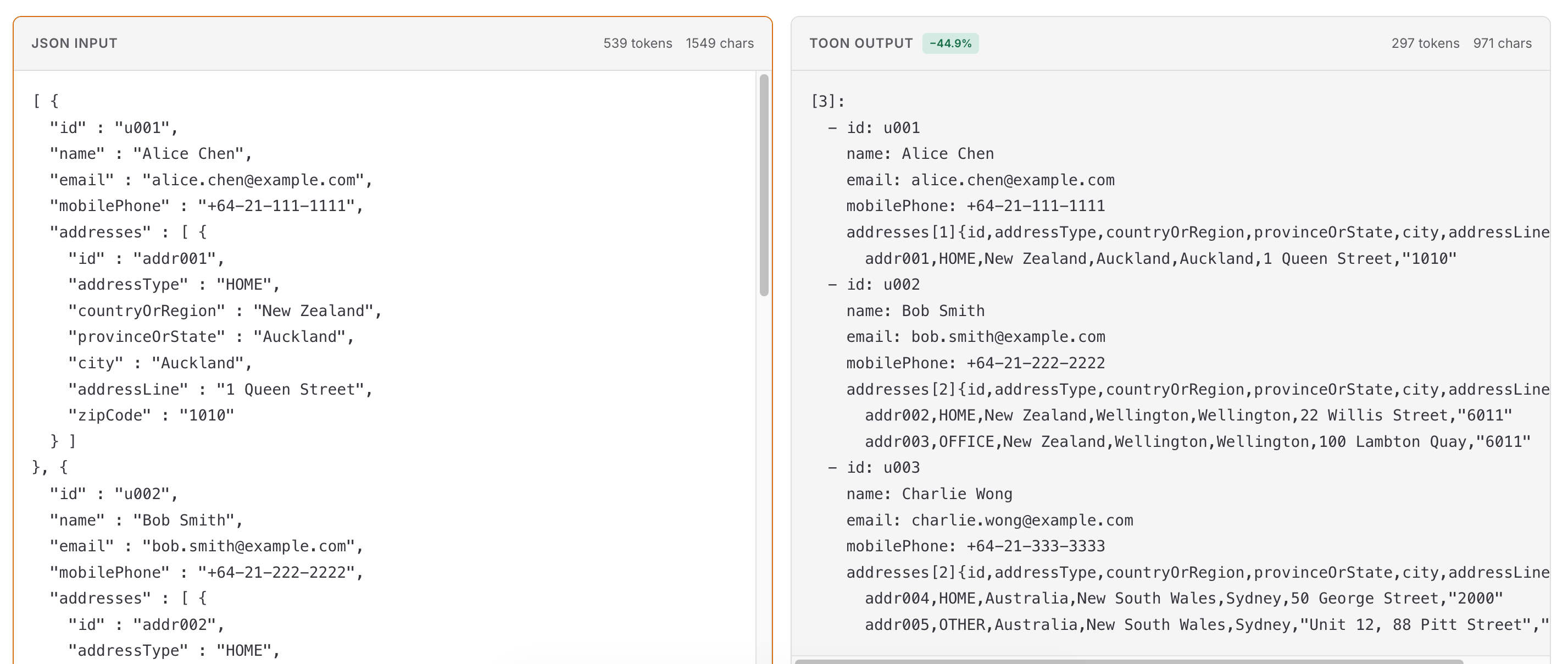
The code generates three User objects. An array containing these three objects is encoded using both JSON and Toon.
package com.javaaidev.toon;

import com.fasterxml.jackson.core.JsonProcessingException;
import com.fasterxml.jackson.databind.ObjectMapper;
import com.fasterxml.jackson.databind.SerializationFeature;
import com.javaaidev.toon.model.Users;
import dev.toonformat.jtoon.JToon;

public class ToonUtils {

  private static final ObjectMapper objectMapper = new ObjectMapper().enable(
      SerializationFeature.INDENT_OUTPUT);

  public static void main(String[] args) throws JsonProcessingException {
    var json = objectMapper.writeValueAsString(Users.USERS);
    var toon = JToon.encode(Users.USERS);
    System.out.println("""
        JSON:
        %s

        TOON:
        %s
        """.formatted(json, toon));
  }
}
The result shows that Toon saves 45% of tokens compared to JSON.
When interacting with LLMs using Spring AI, a prompt template like the one below can be used. This provides a simple description of the Toon format. This is sufficient; the LLM can parse the content itself.
package com.javaaidev.toon.controller;

import com.javaaidev.toon.model.Users;
import dev.toonformat.jtoon.JToon;
import org.springframework.ai.chat.client.ChatClient;
import org.springframework.web.bind.annotation.PostMapping;
import org.springframework.web.bind.annotation.RequestBody;
import org.springframework.web.bind.annotation.RestController;

@RestController
public class ToonController {

  private final ChatClient client;

  public ToonController(ChatClient.Builder builder) {
    this.client = builder.build();
  }

  @PostMapping("/request")
  public ChatOutput request(@RequestBody ChatInput input) {
    var output = client.prompt().user("""
            %s

            Data is in TOON format (2-space indent, arrays show length and fields).
            ```toon
            %s
            ```
            """.formatted(input.input(), JToon.encode(Users.USERS)))
        .call()
        .content();
    return new ChatOutput(output);
  }

  public record ChatInput(String input) {

  }

  public record ChatOutput(String output) {

  }
}
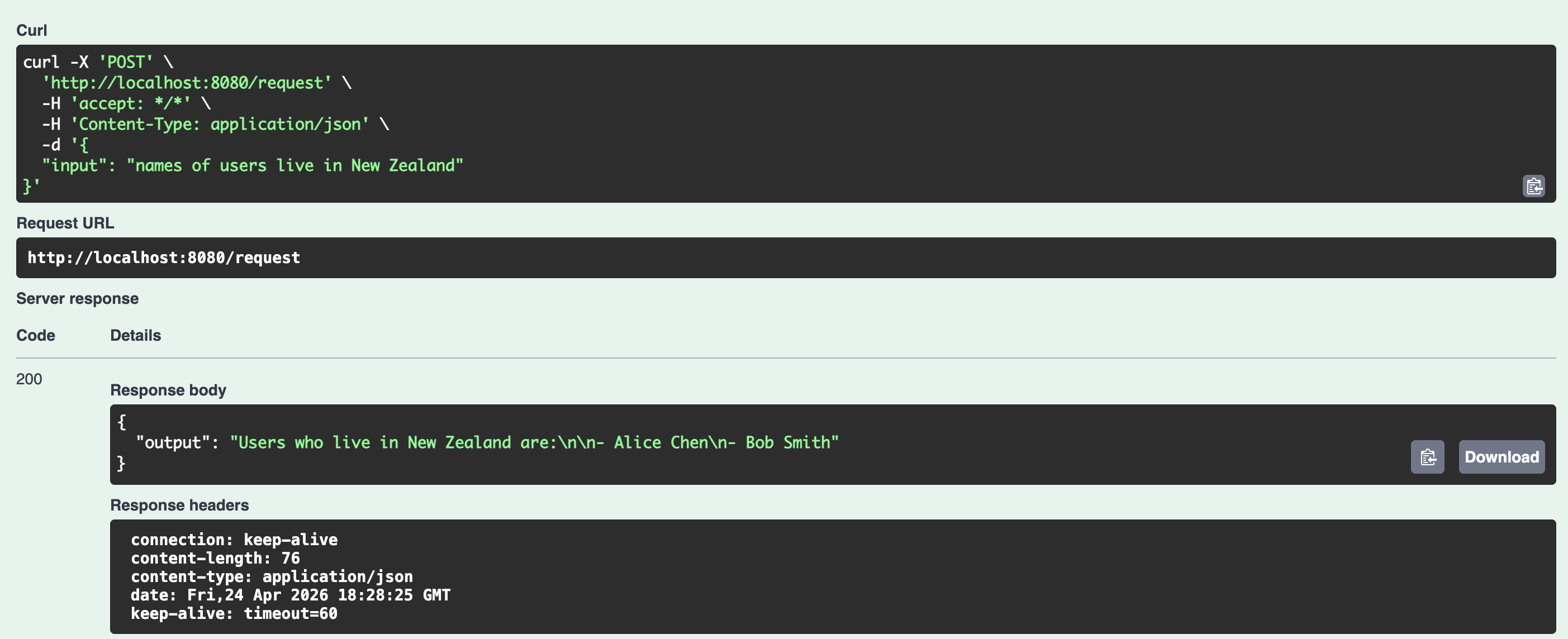
In the actual processing of LLMs, after sending the query and data to the model, the model can correctly parse it.
In summary, encoding data sent to LLMs using the Toon format can reduce token consumption.