Agent Skills
This page comes from my Spring AI book.
Tools give an agent new actions, while skills teach an agent how to use its knowledge and tools to complete a particular kind of task. A tool may allow an agent to read a file, call an API, or execute a command. A skill provides the instructions, workflow, conventions, and reference material needed to apply those capabilities correctly.
For example, a general-purpose model can write marketing copy without a skill. However, its output may not follow a consistent process or ask for important information such as the target audience, channel, and goal. A copywriting skill can describe how to collect this context, select an appropriate copywriting framework, draft the copy, and review the result. The skill does not replace the model. It supplies reusable task-specific guidance when the task calls for it.
An Agent Skill is stored in a directory whose main file is named SKILL.md. The file contains metadata used for skill discovery and instructions used when the skill is activated. A skill directory may also contain reference documents, scripts, templates, or other resources. This makes a skill more than a long system prompt: it is a self-contained package of instructions and supporting material.
Progressive Disclosure
Putting the complete content of every skill into the system prompt does not scale well. Most skills are irrelevant to any single request, but their instructions would still consume context tokens and compete for the model's attention.
Agent Skills use progressive disclosure instead. At the start of a request, the model only sees a catalog containing the name and description of each available skill. The description should make clear when the skill is useful. When a task matches a skill, the model calls a skill-loading tool. The tool then returns the complete SKILL.md content, allowing the model to follow the detailed instructions.
The interaction has the following sequence.
- The application discovers the installed skills.
- The model receives the names and descriptions of those skills as part of a tool definition.
- The model decides whether a skill applies to the user's task.
- The model calls the tool with the selected skill name.
- The application returns the skill instructions to the model.
- The model completes the task by following those instructions and, when necessary, using other tools.
This approach keeps the initial context small while allowing detailed task guidance to be loaded on demand.
Skills and Tools
Skills and tools
| Skill | Tool | |
|---|---|---|
| Purpose | Describes how to perform a task | Performs an action or retrieves data |
| Typical content | Instructions, workflows, examples, and references | Executable Java code or a remote operation |
| Selected by | Name and description | Name, description, and input schema |
| Result of loading or calling | More instructions for the model | Data or an action result |
| Example | A workflow for writing product-launch copy | A function that sends an email |
A skill can instruct the model to use tools, but merely installing a skill does not grant the model any new permission. If a skill asks the model to read files or call an external service, the application must separately provide the corresponding tools.
SkillsJars
Java applications normally distribute reusable components as JAR files. SkillsJars applies the same distribution mechanism to Agent Skills. It packages a skill directory in a JAR under META-INF/skills. The JAR can then be declared as a normal Maven dependency, placed on the application classpath, and loaded by the agent at runtime.
Using a SkillsJar has several advantages.
- A skill is versioned together with its instructions and supporting files.
- Maven resolves and caches the skill in the same way as other dependencies.
- Applications can reproduce a known skill configuration by pinning an exact version.
- Teams can update application code and skill content independently.
The sample application uses a copywriting skill. The following dependency adds the skill to the application classpath.
<dependency>
  <groupId>com.skillsjars</groupId>
  <artifactId>coreyhaines31__marketingskills__copywriting</artifactId>
  <version>2026_03_14-9d4d29a</version>
</dependency>
The artifact contains SKILL.md and additional reference files under the following directory structure.
META-INF/skills/coreyhaines31/marketingskills/copywriting/
├── SKILL.md
├── evals/
│   └── evals.json
└── references/
    ├── copy-frameworks.md
    └── natural-transitions.md
The complete Maven configuration also includes Spring Web MVC, Spring AI's OpenAI model starter, validation support, and spring-ai-agent-utils from the org.springaicommunity group. That last dependency provides the SkillsTool used to discover and load skills.
<dependencies>
  <dependency>
    <groupId>org.springframework.boot</groupId>
    <artifactId>spring-boot-starter-webmvc</artifactId>
  </dependency>
  <dependency>
    <groupId>org.springframework.ai</groupId>
    <artifactId>spring-ai-starter-model-openai</artifactId>
  </dependency>
  <dependency>
    <groupId>org.springaicommunity</groupId>
    <artifactId>spring-ai-agent-utils</artifactId>
    <version>0.5.0</version>
  </dependency>
  <dependency>
    <groupId>com.skillsjars</groupId>
    <artifactId>coreyhaines31__marketingskills__copywriting</artifactId>
    <version>2026_03_14-9d4d29a</version>
  </dependency>
  <dependency>
    <groupId>org.springframework.boot</groupId>
    <artifactId>spring-boot-starter-validation</artifactId>
  </dependency>
  <dependency>
    <groupId>org.springframework.boot</groupId>
    <artifactId>spring-boot-starter-test</artifactId>
    <scope>test</scope>
  </dependency>
</dependencies>
A skill is executable guidance from a third party. Review its instructions and supporting files before adding it to an application, and pin the dependency to a version that has been tested.
Configure the Application
The sample uses an OpenAI chat model. The API key is read from the OPENAI_API_KEY environment variable, and the skill path points to the conventional location inside SkillsJars.
spring:
  ai:
    openai:
      api-key: ${OPENAI_API_KEY}
      chat:
        model: gpt-5.6-luna

agent:
  skills:
    paths: classpath:/META-INF/skills
The classpath: prefix is important. It allows Spring's resource abstraction to search the application classpath, including dependency JARs, instead of looking only in the application's working directory. The value is injected as a List<Resource>, so several comma-separated locations can be configured when skills come from more than one place.
The complete configuration also enables virtual threads and debug logging for SimpleLoggerAdvisor.
spring:
  application:
    name: agent-skills
  threads:
    virtual:
      enabled: true
  ai:
    openai:
      api-key: ${OPENAI_API_KEY}
      chat:
        model: gpt-5.6-luna

agent:
  skills:
    paths: classpath:/META-INF/skills

logging:
  level:
    org.springframework.ai.chat.client.advisor.SimpleLoggerAdvisor: DEBUG
Before starting the application, set the OpenAI API key.
export OPENAI_API_KEY=your-api-key
Create the Agent
CopywritingAgentService creates a ChatClient and registers the skill loader as a default tool.
package com.javaaidev.agentskills;

import java.util.List;
import org.springaicommunity.agent.tools.SkillsTool;
import org.springframework.ai.chat.client.ChatClient;
import org.springframework.ai.chat.client.advisor.SimpleLoggerAdvisor;
import org.springframework.ai.openai.OpenAiChatOptions;
import org.springframework.beans.factory.annotation.Value;
import org.springframework.core.io.Resource;
import org.springframework.stereotype.Service;

/** An OpenAI agent whose copywriting knowledge comes from a SkillsJar. */
@Service
public class CopywritingAgentService {

  private final ChatClient chatClient;

  public CopywritingAgentService(ChatClient.Builder chatClientBuilder,
      @Value("${agent.skills.paths}") List<Resource> skillPaths) {
    this.chatClient = chatClientBuilder
        .defaultSystem("""
            You are a marketing copywriting assistant.
            When a request requires marketing copy, first load and follow the copywriting skill.
            Tailor the copy to the stated audience, channel, and goal.
            Ask for the missing context when it is necessary to produce accurate copy.
            """)
        .defaultTools(SkillsTool.builder()
            .addSkillsResources(skillPaths)
            .build())
        .defaultAdvisors(new SimpleLoggerAdvisor())
        .defaultOptions(OpenAiChatOptions.builder()
            .reasoningEffort("none")
        )
        .build();
  }

  public CopywritingTaskResponse create(CopywritingTaskRequest request) {
    String response = chatClient.prompt()
        .user(request.task())
        .call()
        .content();
    return new CopywritingTaskResponse(response);
  }
}
The constructor receives two Spring-managed objects. ChatClient.Builder is auto-configured by Spring AI for the selected OpenAI model. skillPaths contains the resources configured by agent.skills.paths.
The agent is assembled from the following parts.
defaultSystemdefines the agent's role and tells it to load the copywriting skill before producing marketing copy. It also identifies the context that may need to be collected from the user.SkillsTool.builder().addSkillsResources(skillPaths).build()discovers all skills in the configured resources and creates a Spring AIToolCallback.defaultToolsmakes this callback available on every request sent through the client.SimpleLoggerAdvisorlogs request and response details, which is useful while observing skill selection during development.defaultOptionssetsreasoningEfforttonone. Recent OpenAI model families, such as GPT-5.4 and later, do not support tool calling through the Chat Completions API unless the reasoning effort is explicitly set tonone. Without this option the API call to OpenAI returns a400error.
SkillsTool reads the front matter of each SKILL.md and builds a catalog of available skills. The catalog becomes part of the tool description visible to the model. When the model calls the tool with a skill name, SkillsTool returns the corresponding instructions together with the skill's base directory. The base directory allows instructions to refer to supporting files relative to the skill.
The service method itself remains small. The create method sends the task as the user message and wraps the generated content in a response object. Skill loading therefore happens inside the normal Spring AI tool-calling loop. The controller and the caller do not need to select or load the skill explicitly.
Publish the Agent as an API
The request contains a single non-blank task value, while the response contains the generated copy.
package com.javaaidev.agentskills;

import jakarta.validation.constraints.NotBlank;

public record CopywritingTaskRequest(@NotBlank String task) {
}
package com.javaaidev.agentskills;

public record CopywritingTaskResponse(String response) {
}
CopywritingAgentController publishes the agent at POST /copywriting/tasks. The @Valid annotation applies the validation constraint declared by the request record before the task reaches the model.
package com.javaaidev.agentskills;

import jakarta.validation.Valid;
import org.springframework.web.bind.annotation.PostMapping;
import org.springframework.web.bind.annotation.RequestBody;
import org.springframework.web.bind.annotation.RequestMapping;
import org.springframework.web.bind.annotation.RestController;

@RestController
@RequestMapping("/copywriting")
public class CopywritingAgentController {

  private final CopywritingAgentService copywritingAgentService;

  public CopywritingAgentController(
      CopywritingAgentService copywritingAgentService) {
    this.copywritingAgentService = copywritingAgentService;
  }

  @PostMapping("/tasks")
  public CopywritingTaskResponse run(
      @Valid @RequestBody CopywritingTaskRequest request) {
    return copywritingAgentService.create(request);
  }
}
Run the application with Maven.
mvn spring-boot:run
Test the endpoint with the following request.
curl -X POST http://localhost:8080/copywriting/tasks \
  -H 'Content-Type: application/json' \
  -d '{"task":"Use the copywriting skill to write a concise launch email for a new project-management app aimed at small design teams."}'
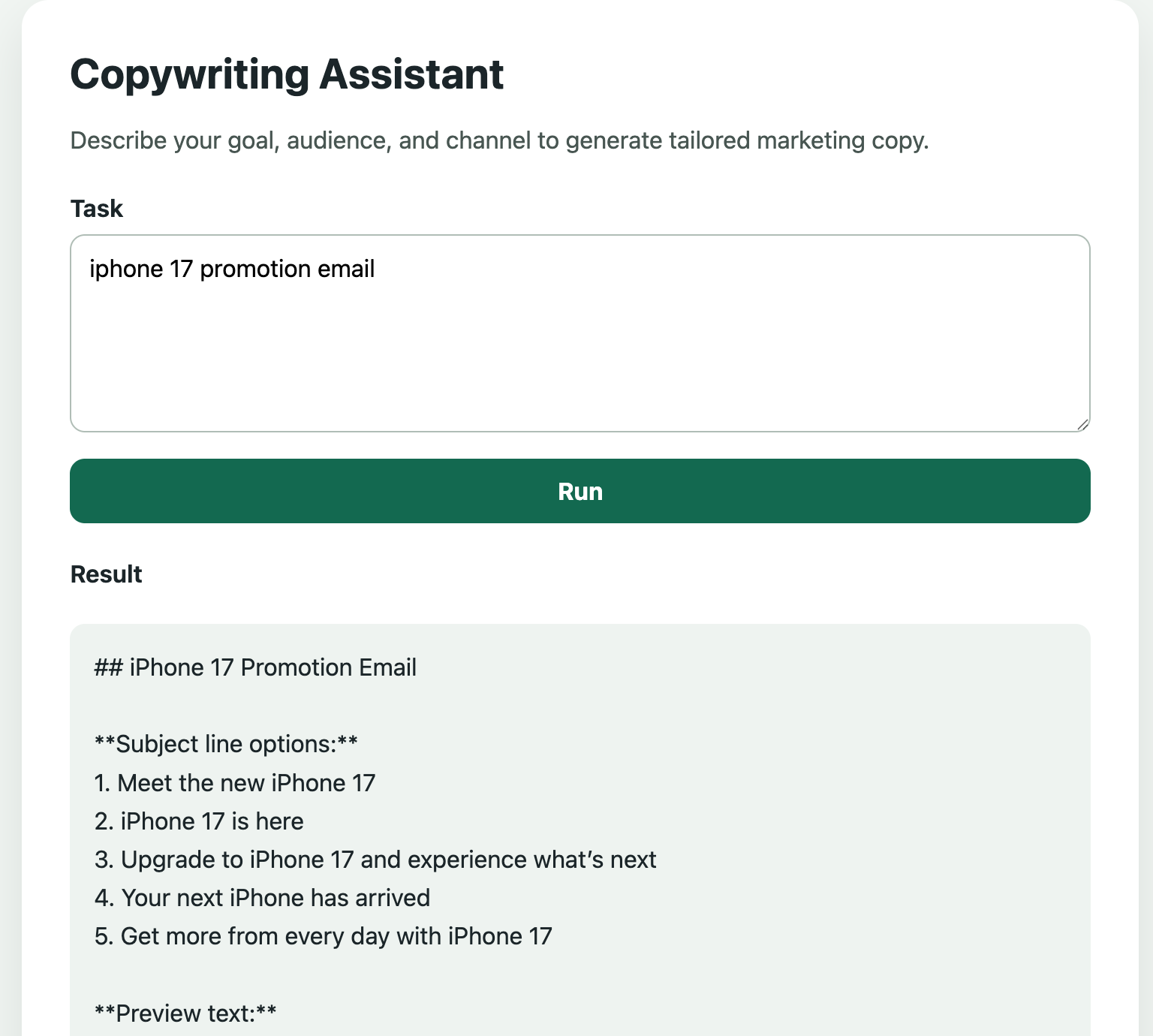
The sample also includes a simple web interface at http://localhost:8080. It sends the same JSON request to the REST API and displays the generated response.
The following screenshot shows the copywriting agent generating a promotional email. The agent loads the copywriting skill and applies its instructions to produce subject line options, preview text, and the email content.
Designing Reliable Skill-Based Agents
Adding a skill improves the instructions available to an agent, but it does not guarantee a correct result. A few practices help.
Keep the system prompt and the skill responsible for different things. The system prompt should define the stable identity and application-level rules of the agent, while a skill contains reusable guidance for a particular type of task. Duplicating detailed instructions in both locations makes maintenance difficult and can produce conflicting directions.
Write precise skill metadata. Progressive disclosure depends on the model selecting the right skill from its name and description alone. A vague description may cause the model to ignore a relevant skill, or to load it for unrelated requests.
Treat skills as untrusted application dependencies. Their instructions can influence how a model uses every tool available to it. Review skill updates, pin versions, give the agent only the tools it needs, validate tool arguments, and require explicit approval for sensitive operations.
Evaluate the complete workflow, not just the loading step. Tests should cover whether the agent selects the skill for matching requests, avoids it for unrelated requests, follows the loaded instructions, and produces an acceptable final result. These behavioral checks are more useful than testing only whether SKILL.md can be loaded.
Agent Skills separate reusable task expertise from application code. With SkillsJars and SkillsTool, a Spring AI application can discover versioned skills from its classpath and load detailed instructions only when they are relevant.