AG-UI: 状态管理
对于一个智能体来说,要从简单的聊天机器人提升为能够解决实际问题的智能助手,状态管理是很重要的一环。
在聊天机器人式的交互中,用户消息和 LLM 响应交替出现,每次 LLM 都基于历史消息生成新的响应。全部上下文都保存在消息历史中,这是一种线性的状态叠加方式。对于单纯的文本问答,这种模式通常已经足够,因为用户主要关注最近一次响应。
在更复杂的场景中,消息历史并不适合充当唯一的数据源。用户每次可能只提供部分信息,而智能体需要依据多轮交互中累积的结构化数据作出判断。如果每次都让 LLM 从自然语言历史中重新抽取这些数据,不仅浪费上下文窗口,也容易遇到信息遗漏、重复和新旧值冲突等问题。
状态可以看作用户与智能体共享的结构化工作区。界面可以直接展示和修改状态,智能体也可以通过工具调用更新状态。消息记录“发生过什么”,状态则描述“现在是什么”。
以行程规划为例,一个完整状态可能包含:
- 行程基本信息:人数、起止日期、出发地和目的地;
- 动态环境信息:天气、景点开放时间;
- 用户的长期偏好:喜欢或不喜欢的地点类型;
- 本次规划的选择:用户在之前步骤中添加或删除的地点;
- 当前行程方案:智能体最近一次生成的规划结果。
在多轮交互中,用户可以通过表单或自然语言补充基本信息,智能体可以通过工具查询天气,用户也可以直接删除行程中的某个景点。不同参与者修改的是同一个状态对象,因此聊天界面和其他界面组件始终能够围绕同一份数据协作。
AG-UI 中的状态同步
AG-UI 使用状态管理事件在智能体和客户端之间传递状态,主要包括以下两种事件。
| 事件 | 作用 | 适用场景 |
|---|---|---|
StateSnapshot | 发送某一时刻的完整状态 | 初始化客户端状态,或用后端的权威结果替换本地状态 |
StateDelta | 使用 JSON Patch 发送相对于当前状态的变化 | 状态较大、单次只修改少量字段时,减少传输量 |
状态事件与文本消息事件的职责不同。文本消息通过 TextMessageStart、TextMessageContent 和 TextMessageEnd 组成流式输出;状态事件传输的则是可供程序直接使用的数据。客户端收到状态事件后,不需要再从自然语言回复中解析食材、日期或行程等业务信息。
状态同步通常是双向的:
这里需要区分两个时间点:调用 setState 会先修改客户端中智能体的状态;该状态会在下一次运行时随请求发送给后端。后端在运行过程中产生的新状态,则通过 AG-UI 状态事件返回客户端。应用可以先乐观更新界面,再以服务端返回的状态为准进行同步。
菜谱规划示例
下面用菜谱规划来演示完整的双向状态管理。这个示例沿用做菜助手智能体:智能体维护一份可用食材列表,用户通过界面直接添加或删除已选择的食材,也可以在聊天中要求智能体修改食材。确定食材后,智能体再据此推荐菜谱。
在真实应用中,可用食材还可以来自智能冰箱、库存系统或购物记录。如果购买和消耗也由智能体管理,状态就可以持续反映实际库存。
定义状态结构
智能体状态继承自 LangGraph 的 MessagesState,因此除消息历史外,还增加了两个业务字段:
available_ingredients:系统当前可提供的食材;selected_ingredients:用户本次准备使用的食材。
class AgentState(MessagesState):
    available_ingredients: list[str]
    selected_ingredients: list[str]
使用独立字段保存这两类数据很重要。available_ingredients 描述库存范围,selected_ingredients 描述当前选择;界面可以据此区分“库存中已有”和“用户额外输入”的食材,而不必让 LLM 根据消息猜测。
通过工具更新状态
获取可用食材
get_available_ingredients 返回一份固定的食材列表,用来模拟从外部库存系统查询数据。工具通过 InjectedState 读取当前状态。如果 selected_ingredients 字段尚不存在,就用全部可用食材初始化它;如果用户已经作出选择,则保留原值,避免重新查询库存时覆盖用户的修改。
@tool
def get_available_ingredients(
    tool_call_id: Annotated[str, InjectedToolCallId],
    state: Annotated[dict, InjectedState],
) -> Command:
    """Return available ingredients and initialize the selected list if needed."""
    available_ingredients = [
        "chicken breast",
        "eggs",
        "tomatoes",
        "onions",
        "garlic",
        "potatoes",
        "carrots",
    ]
    update = {"available_ingredients": available_ingredients}
    if "selected_ingredients" not in state:
        update["selected_ingredients"] = available_ingredients
    return Command(update={
        **update,
        "messages": [ToolMessage(
            "Available ingredients state updated.",
            tool_call_id=tool_call_id,
        )],
    })
工具返回的不是普通字符串,而是 LangGraph 的 Command。Command.update 可以在一次图更新中同时写入业务字段和 messages。其中 ToolMessage 与当前 tool_call_id 关联,用来完成本次工具调用的消息协议;业务状态则供界面和后续模型调用使用。
更新已选择食材
当用户在对话中说明“加入鸡蛋”或“不要洋葱”时,LLM 调用 update_ingredients,传入更新后的完整列表。这个示例采用“替换整个列表”的语义,结果明确,也避免分别处理增加、删除和重复项时出现歧义。
@tool
def update_ingredients(
    selected_ingredients: list[str],
    tool_call_id: Annotated[str, InjectedToolCallId],
) -> Command:
    """Update the selected ingredients list in the agent state.

    Args:
        selected_ingredients: The list of ingredients selected for cooking.

    Returns:
        A Command that updates the agent state with the provided ingredients.
    """
    return Command(update={
        "selected_ingredients": selected_ingredients,
        "messages": [ToolMessage(
            "Selected ingredients state updated.",
            tool_call_id=tool_call_id,
        )],
    })
InjectedToolCallId 和 InjectedState 都由运行时注入,不会作为工具参数暴露给 LLM。模型只需要决定业务参数,例如 selected_ingredients。
让当前状态成为 LLM 的事实来源
界面和工具都可能修改 selected_ingredients。如果 LLM 仍然依据早期消息中的旧列表回答,状态同步就失去了意义。因此,每次调用模型前,都要把最新状态注入 system prompt,并明确说明当前状态比历史消息中的食材列表更权威。
BASE_PROMPT = (
    "You are a cooking assistant that provides practical, safe, and concise "
    "cooking advice. ..."
)

def _inject_ingredients(request):
    ingredients = (request.state or {}).get("selected_ingredients") or []
    current_ingredients = ", ".join(ingredients) if ingredients else "none"
    content = (
        BASE_PROMPT
        + f"\n\nThe user currently has these selected ingredients: {current_ingredients}."
        + "\nThis selected ingredients list is authoritative. Ignore any ingredient lists "
        + "from earlier messages or tool results."
    )
    return request.override(system_message=SystemMessage(content=content))

class IngredientsMiddleware(AgentMiddleware):
    def wrap_model_call(self, request, handler):
        return handler(_inject_ingredients(request))

    async def awrap_model_call(self, request, handler):
        return await handler(_inject_ingredients(request))
middleware 同时实现同步和异步入口。无论模型通过哪种方式被调用,提示词中的食材都来自本次运行的 request.state,而不是某次工具调用返回的旧文本。
创建支持状态的 LangGraph 智能体
创建智能体时,需要通过 state_schema 注册自定义状态结构,并把 middleware 和两个状态工具加入智能体。检查点保存器负责按照会话保存图状态。
return create_agent(
    model=MODEL,
    system_prompt=BASE_PROMPT,
    middleware=[IngredientsMiddleware()],
    tools=[
        convert_temperature,
        get_available_ingredients,
        update_ingredients,
        *mcp_tools,
    ],
    state_schema=AgentState,
    checkpointer=InMemorySaver(),
)
示例使用 InMemorySaver,适合本地演示,但进程重启后状态会丢失。生产环境通常应换成持久化检查点存储,并让不同用户或会话使用不同的线程标识,避免状态相互污染。
通过 AG-UI 暴露智能体
LangGraph 图由 LangGraphAgent 包装,并通过 FastAPI 暴露为 AG-UI 端点。ag-ui-langgraph 集成会把请求中的状态写入图状态,并把图运行时的状态变化转换为 AG-UI 事件。
app = FastAPI(title="LangGraph AG-UI Agent")

graph = build_graph()

agui_agent = LangGraphAgent(
    name="cooking-agent",
    description="A simple LangGraph agent exposed over the AG-UI protocol.",
    graph=graph,
)

add_langgraph_fastapi_endpoint(app, agui_agent, "/agent")
这样,业务图只负责状态和智能体逻辑,AG-UI 适配层负责协议转换,前端不需要了解 LangGraph 内部节点的实现。
在前端订阅后端状态
前端的食材面板使用 useAgent 获取当前智能体。组件挂载时先读取 agent.state,避免必须等到下一个事件才显示已有状态;之后订阅 onStateSnapshotEvent,在收到完整快照时更新两个本地列表。onRunFinalized 再同步一次最终状态,保证一次运行结束后界面与 agent 中保存的结果一致。
type AgentState = {
  available_ingredients?: string[];
  selected_ingredients?: string[];
};

const { agent } = useAgent();
const [ingredients, setIngredients] = useState<string[]>([]);
const [availableIngredients, setAvailableIngredients] = useState<string[]>([]);

useEffect(() => {
  const syncState = (state: AgentState) => {
    setAvailableIngredients(state.available_ingredients ?? []);
    setIngredients(state.selected_ingredients ?? []);
  };

  syncState(agent.state as AgentState);

  const subscriber = agent.subscribe({
    onStateSnapshotEvent: ({ state }) => syncState(state as AgentState),
    onRunFinalized: ({ state }) => syncState(state as AgentState),
  });

  return () => subscriber.unsubscribe();
}, [agent]);
清理函数中的 unsubscribe 可以避免组件重新挂载后产生重复订阅。字段使用 ?? [] 提供默认值,是因为首次运行前后端状态可能还没有这两个可选字段。
从界面更新智能体状态
当用户在面板中添加或删除食材时,组件先更新 React 本地状态,让界面立即响应;然后调用 agent.setState 更新客户端保存的智能体状态。展开原有的 agent.state 可以保留消息和其他业务字段,只替换 selected_ingredients。
const updateIngredients = (next: string[]) => {
  setIngredients(next);
  agent.setState({
    ...(agent.state as object),
    selected_ingredients: next,
  });
};

const removeIngredient = (index: number) => {
  updateIngredients(ingredients.filter((_, i) => i !== index));
};

const addIngredient = () => {
  const trimmed = newItem.trim();
  if (!trimmed) return;
  updateIngredients([...ingredients, trimmed]);
  setNewItem("");
};
这里的 setState 不会单独启动一次智能体运行。下一次用户发送消息时,更新后的状态会随运行请求传给后端,并成为 middleware 和工具所读取的当前状态。如果业务要求用户每次编辑后立即触发后端校验或重新规划,则还需要显式启动一次运行。
状态更新的两条路径
这个示例最终形成了两条互补的更新路径。
| 操作入口 | 更新过程 | 同步结果 |
|---|---|---|
| 用户操作食材面板 | React 本地状态 → agent.setState → 下一次 AG-UI 请求 → LangGraph 状态 | 后续 LLM 调用读取界面修改后的列表 |
| 用户通过自然语言修改食材 | LLM 调用 update_ingredients → Command.update → AG-UI 状态事件 → React 本地状态 | 食材面板显示智能体修改后的列表 |
这也是共享状态相对于纯聊天记录的核心价值:同一份结构化数据既可以由确定性的界面控件修改,也可以由 LLM 借助工具修改,而两者都能看到对方的最新结果。
演示
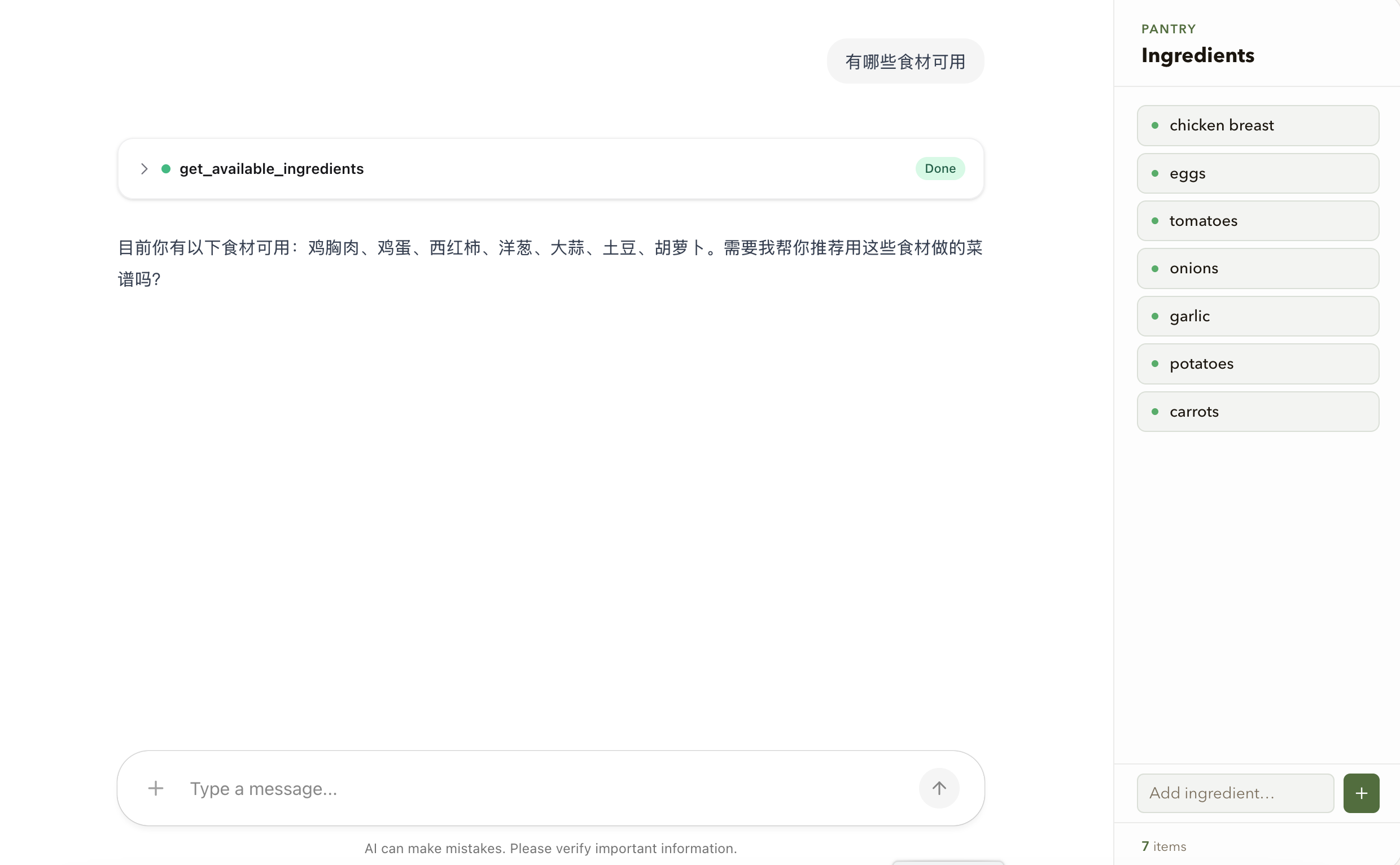
获取可用食材
LLM 调用 get_available_ingredients 获取可用食材。如果用户尚未选择食材,工具还会初始化 selected_ingredients。后端状态通过快照事件传到客户端,界面右侧的食材列表随之更新。
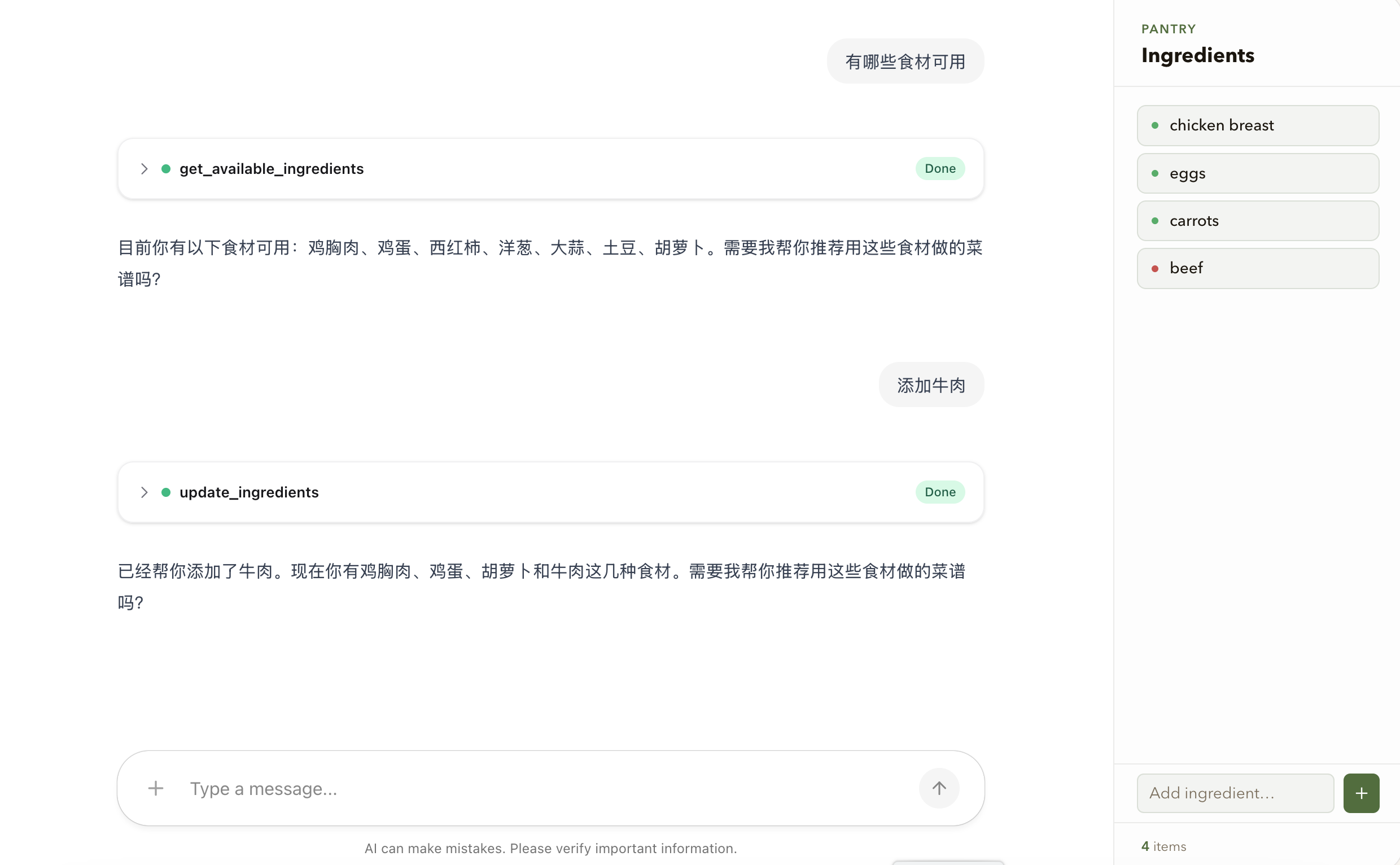
修改所选择的食材
用户可以直接在右侧面板添加或删除食材,也可以在对话中提出要求。前一种方式调用 agent.setState,后一种方式由 LLM 调用 update_ingredients;最终两者都会修改 selected_ingredients。
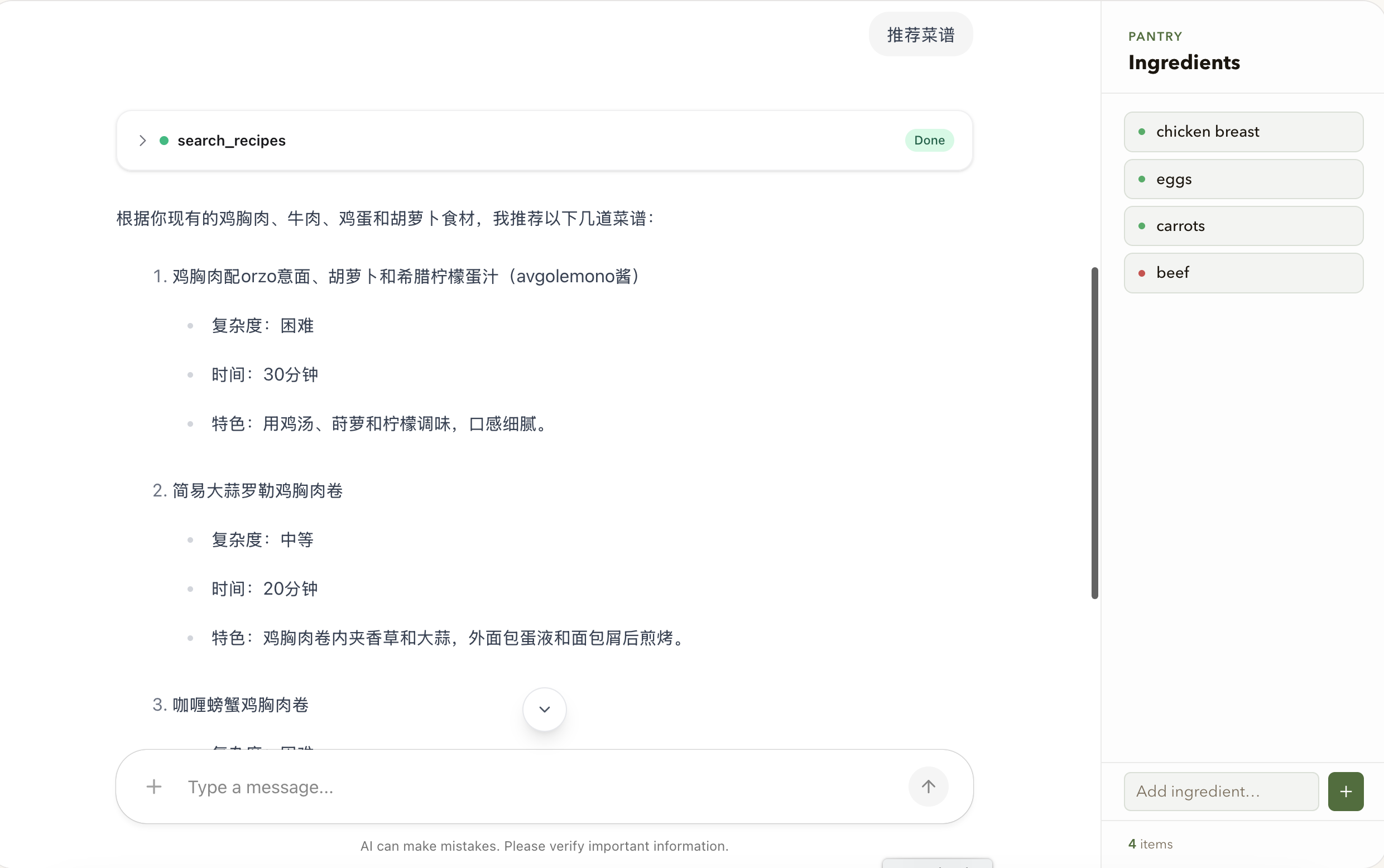
推荐菜谱
当用户要求推荐菜谱时,middleware 把当前 selected_ingredients 注入提示词。LLM 因此依据结构化状态中的最新选择进行推荐,而不需要从全部历史消息中重新推断食材。
实现要点
- 把需要被界面直接消费的业务数据放入结构化状态,不要只写在消息文本中。
- 明确每个字段的含义和更新策略,例如本例对
selected_ingredients使用完整替换,而不是隐式合并。 - 在模型调用时从当前状态生成提示词,并规定状态与历史消息冲突时的优先级。
- 前端初始化时读取已有状态,运行中订阅状态事件,组件卸载时取消订阅。
- 调用
setState时保留无关字段;不要为更新一个属性而意外清空整个状态。 - 将本地界面更新视为即时反馈,将服务端返回的状态视为最终同步结果。
- 生产环境使用持久化检查点存储,并为用户和会话设计清晰的隔离策略。