AG-UI: State Management
For an agent to grow from a simple chatbot into an intelligent assistant capable of solving real-world problems, state management is essential.
In chatbot-style interactions, user messages and LLM responses alternate, and each response is generated from the message history. This linear accumulation of context is usually sufficient for simple text-based question answering. In more complex scenarios, however, the message history should not be the only source of data. Users may provide partial information over multiple turns, while the agent needs structured data to make decisions. Re-extracting that data from natural-language history wastes context-window space and can cause omissions, duplication, or conflicts between old and new values.
State is a structured workspace shared by the user and the agent. The UI can display and modify it directly, while the agent can update it through tool calls. Messages record “what happened”; state describes “what is true now.”
For example, a trip-planning state may contain basic trip information, dynamic data such as weather and opening hours, long-term user preferences, places added or removed during the current plan, and the latest itinerary generated by the agent. Different participants can modify the same state object, allowing chat and other UI components to collaborate around one source of truth.
State Synchronization in AG-UI
AG-UI uses state-management events to transfer state between the agent and client:
| Event | Purpose | Use case |
|---|---|---|
StateSnapshot | Sends the complete state at a point in time | Initialize client state or replace local state with an authoritative backend result |
StateDelta | Sends changes relative to the current state using JSON Patch | Reduce transfer size when only a few fields change |
Text messages stream through TextMessageStart, TextMessageContent, and TextMessageEnd; state events carry data that programs can consume directly. Clients therefore do not need to parse ingredients, dates, or itinerary details from natural-language replies.
State synchronization is typically bidirectional:
Calling setState first changes the agent state on the client; the updated state is sent with the next run. State produced by the backend during that run returns through AG-UI state events. Applications can update the UI optimistically and then synchronize with the server result.
Recipe Planning Example
This example demonstrates bidirectional state management with a cooking assistant. The agent maintains available ingredients, while the user can add or remove selected ingredients in the UI or ask the agent to modify them in chat. The agent then recommends recipes based on the final selection.
Define the State Schema
The agent state inherits from LangGraph's MessagesState and adds two business fields:
available_ingredients: ingredients currently available;selected_ingredients: ingredients selected for the current cooking session.
class AgentState(MessagesState):
    available_ingredients: list[str]
    selected_ingredients: list[str]
Keeping these fields separate lets the UI distinguish inventory from the user's current selection without asking the LLM to infer that distinction from messages.
Update State Through Tools
get_available_ingredients can query an external inventory system. It reads the current state through InjectedState, stores the available list, and initializes selected_ingredients only when that field does not yet exist, so an inventory refresh does not overwrite the user's choices.
update_ingredients receives the complete updated list and uses Command.update to replace selected_ingredients. InjectedToolCallId and InjectedState are injected by the runtime and are not exposed to the LLM as tool parameters.
Make Current State the LLM's Source of Truth
Before every model call, inject the latest selected_ingredients into the system prompt and state explicitly that it takes precedence over ingredient lists in earlier messages or tool results:
def _inject_ingredients(request):
    ingredients = (request.state or {}).get("selected_ingredients") or []
    current_ingredients = ", ".join(ingredients) if ingredients else "none"
    content = (
        BASE_PROMPT
        + f"\n\nThe user currently has these selected ingredients: {current_ingredients}."
        + "\nThis selected ingredients list is authoritative. Ignore any ingredient lists "
        + "from earlier messages or tool results."
    )
    return request.override(system_message=SystemMessage(content=content))
Implement both synchronous and asynchronous middleware entry points so the prompt always uses request.state from the current run.
Create and Expose the Agent
Register the custom schema with state_schema, add the middleware and state tools, and configure a checkpointer. InMemorySaver is suitable for local demonstrations; production systems should use persistent checkpoint storage and separate thread identifiers for users or conversations.
Wrap the graph with LangGraphAgent and expose it through FastAPI. The ag-ui-langgraph integration writes request state into the graph and converts runtime changes into AG-UI events, keeping protocol conversion separate from business logic.
Synchronize State with the Frontend
Use useAgent to access the current agent. On mount, read agent.state immediately, then subscribe to onStateSnapshotEvent and onRunFinalized to synchronize local lists. Unsubscribe during cleanup to prevent duplicate subscriptions. Use ?? [] because optional state fields may not exist before the first run.
When the user edits the ingredient panel, update React state for immediate feedback and call agent.setState while spreading the existing state so messages and unrelated fields are preserved. setState does not start a run by itself; the next message sends the updated state to the backend. Immediate backend validation or replanning requires explicitly starting a run.
Two Paths for State Updates
| Entry point | Update flow | Synchronization result |
|---|---|---|
| User interacts with the ingredient panel | React local state → agent.setState → next AG-UI request → LangGraph state | Later LLM calls read the UI's updated list |
| User modifies ingredients through natural language | LLM calls update_ingredients → Command.update → AG-UI state event → React local state | The ingredient panel displays the agent's updated list |
This is the core value of shared state: the same structured data can be modified by deterministic UI controls or by the LLM through tools, and both can see the latest result.
Demo
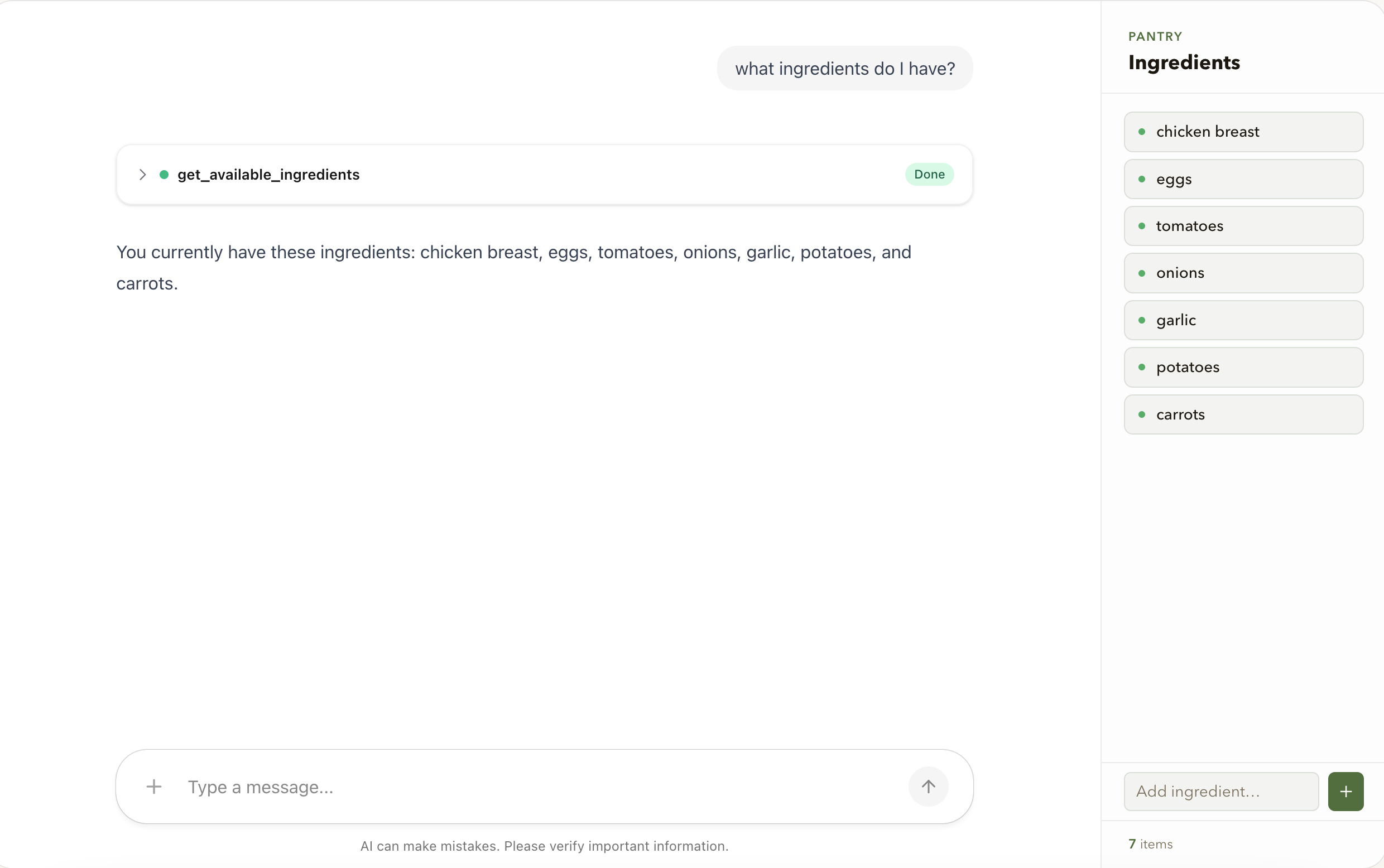
Get Available Ingredients
The LLM calls get_available_ingredients; if necessary, the tool also initializes selected_ingredients. A snapshot event sends the backend state to the client and updates the ingredient list.
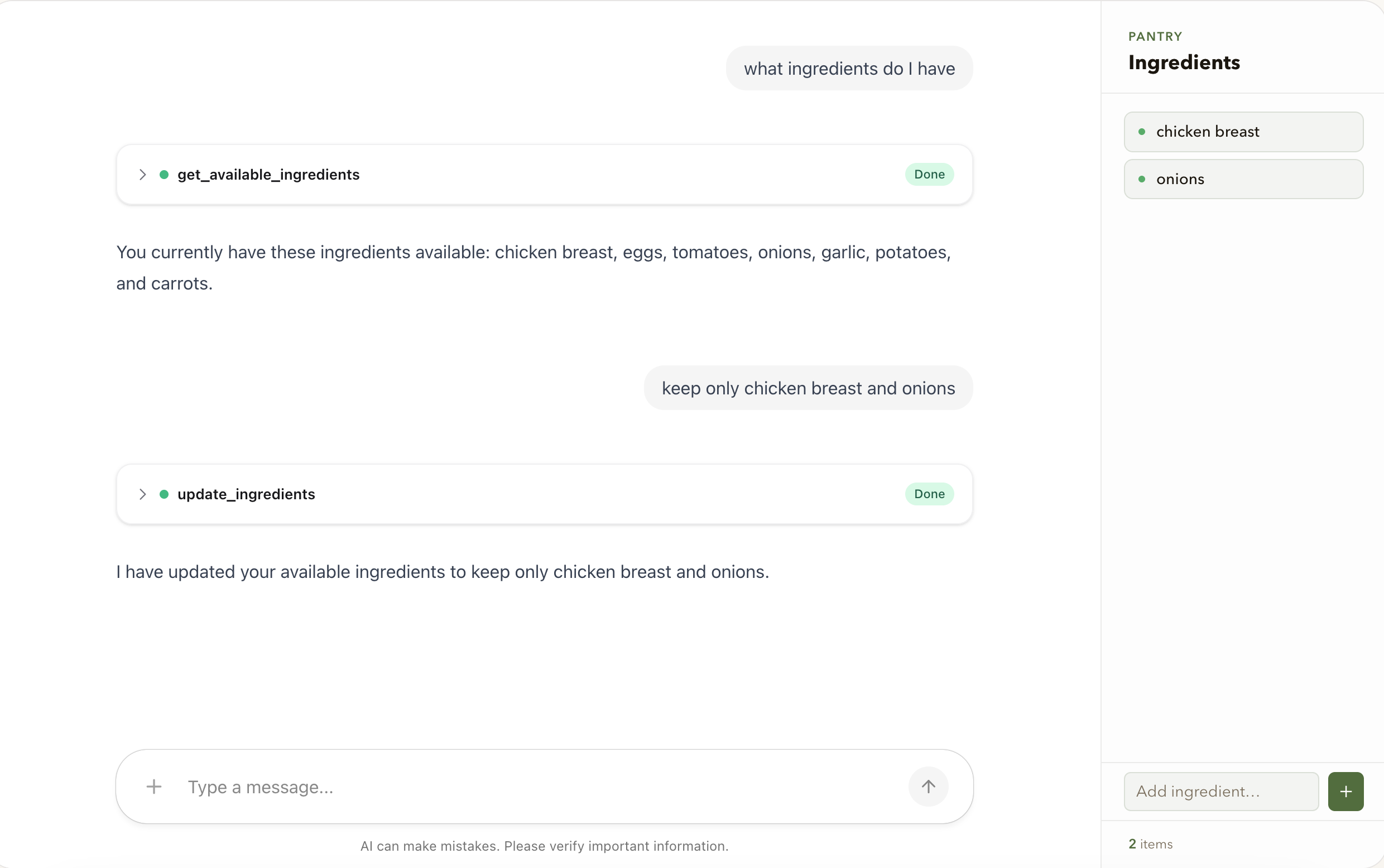
Modify Selected Ingredients
Users can add or remove ingredients in the right-hand panel or request changes in chat. Both paths ultimately modify selected_ingredients.
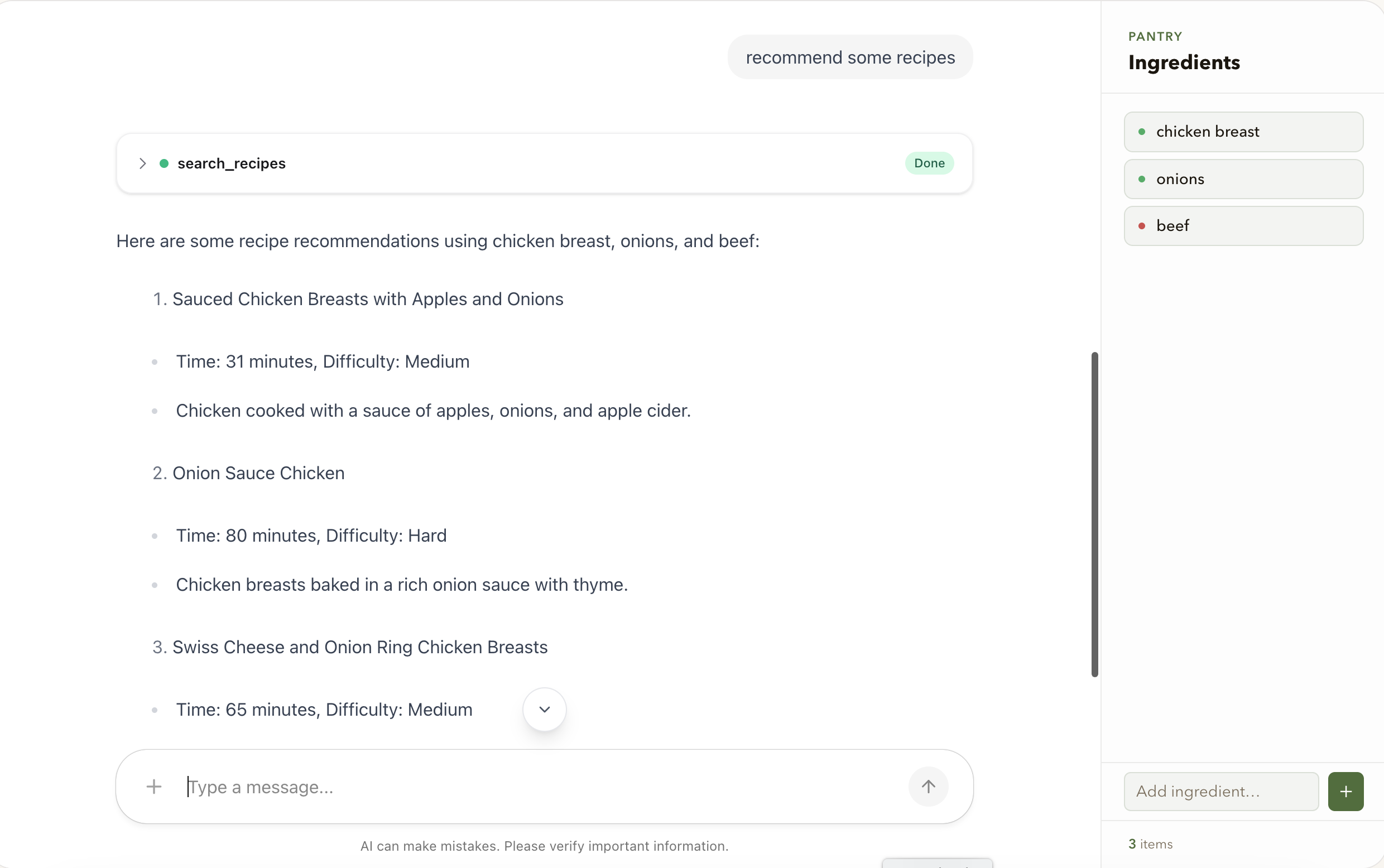
Recommend Recipes
The middleware injects the current selected_ingredients into the prompt, allowing the LLM to recommend recipes from structured state without re-inferring ingredients from the full message history.
Key Implementation Points
- Put UI-facing business data in structured state, not only in message text.
- Define each field's meaning and update strategy explicitly.
- Generate prompts from current state and define its priority over conflicting history.
- Initialize from existing state, subscribe to state events, and unsubscribe on unmount.
- Preserve unrelated fields when calling
setState. - Treat local updates as immediate feedback and server state as the final synchronization result.
- Use persistent checkpoints in production and isolate state by user and conversation.